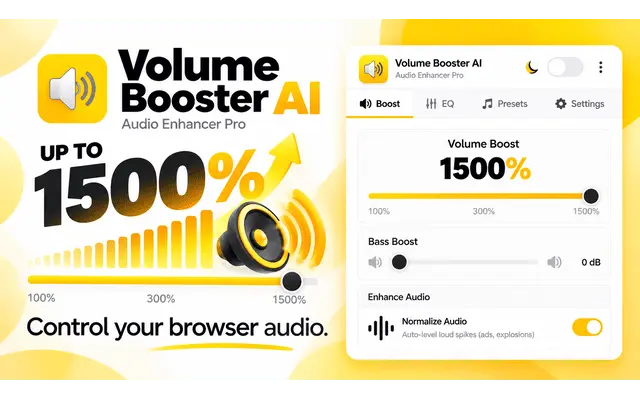
Best Volume Booster Chrome Extension β Up to 600%
Amplify your audio levels up to 600% with the best volume booster chrome extension. Perfect for YouTube, Netflix, Spotify, and all websites. Take total control with our free, lightweight tool and never miss audio details again!
How It Works
Install Extension
Click the "Add to Chrome" button to install our Volume Booster Chrome Extension instantly.
Pin & Activate
Pin the volume booster extension to your toolbar and click it to open the control panel.
Boost Sound
Adjust the slider to amplify your audio levels up to 600% on any website.
Why Our Volume Booster Extension is the Best?
Experience high-quality audio amplification with the most advanced sound booster for Chrome.
Up to 600% Amplification
Our Volume Booster Chrome Extension allows you to increase sound levels far beyond the system default, reaching up to 600% without losing quality.
Per-Tab Volume Control
Take full control of your browser. Adjust the volume for each tab individually to balance sound across different websites easily.
Safe for Speakers
Unlike other tools, our sound booster uses a safety algorithm to prevent audio clipping and protect your hardware from damage.
Universal Compatibility
Simple volume booster works perfectly on all major platforms including YouTube, Netflix, Spotify, Prime Video, and any HTML5 video/audio site.
Zero Latency
Optimized for speed. Our lightweight extension ensures your audio stays perfectly synced with your video without any lag or delay.
One-Click Activation
No complicated settings. Just click the icon and slide to boost. Itβs the simplest way to increase volume in Chrome.
Ultimate Guide to Volume Booster Chrome Extension
Why do you need a Sound Booster for Chrome?
Sometimes, your laptop speakers or headphones are just not loud enough, especially when watching movies on Netflix or listening to music on YouTube. Our Volume Booster Chrome Extension is designed to solve this problem by amplifying the sound digitally up to 600% without distortion.
Is it safe to boost volume up to 600%?
Yes, our extension uses advanced audio processing algorithms. While it provides a massive sound boost, it is engineered to keep the audio signal clean, protecting your speakers from "clipping" or hardware damage that occurs with low-quality amplifiers.
Quick Technical Specs
- Max Boost: 600% (6x Level)
- Compatibility: HTML5 Video/Audio
- Resource Usage: Ultra-Low (Lighter than competitors)
- Privacy: No Data Collection
Why Choose Our Sound Booster Tool?
We provide the most reliable Volume Booster Chrome Extension designed for users who demand high-quality audio without compromises. While competitors offer basic amplification, we focus on safety, clarity, and performance.
Trusted by thousands of professionals, students, and audio enthusiasts worldwide for daily browsing.
Consistently rated as the best sound booster extension in the Chrome Web Store for its reliability.
Industry-leading volume booster technology combined with advanced audio protection algorithms.
Safe Audio Processing
Our simple volume booster isn't just about loudness. We use a unique limiter that prevents sound clipping, ensuring your hardware remains safe even at 600% volume levels.
The Best Sound Booster Chrome
Whether it's YouTube, Netflix, or Spotify, our sound booster chrome tool integrates seamlessly with all HTML5 players to deliver a crisp, amplified sound experience.
What Users Say About Us
I was looking for a reliable volume booster extension chrome to help with my quiet laptop speakers. This one is perfect, the sound is loud and clear without any buzzing.
Finally, a simple volume booster that actually works. It's very easy to use and I love how I can control the volume for each tab separately while watching Netflix.
Best sound booster chrome tool I've tried so far. It really helps when I'm in a noisy environment and need to hear my online meetings more clearly.
Great sound booster extension! I use it every day for YouTube and Spotify. The interface is clean and it doesn't slow down my browser at all.
Highly recommend this volume booster extension chrome. It's lightweight and the 600% boost is amazing for movies with low audio levels.
If you need a sound booster chrome, this is the one. It's free, safe, and works on every website I've visited. Very happy with it!
Frequently Asked Questions
Everything you need to know about the best Volume Booster Chrome Extension.
Is the Volume Booster Chrome Extension free to use?
Will it damage my speakers if I boost to 600%?
Does it work on Netflix and YouTube?
How do I turn off the volume boost?
Is my data safe with this extension?
The Complete Guide to Using a Volume Booster Chrome Extension in 2026
Everything you need to know about amplifying your browser's audio safely, effectively, and for free.
Introduction: Why Audio Control Matters in the Digital Age
In an era where digital consumption has become the cornerstone of entertainment and professional communication, the quality and level of your audio are more important than ever. Whether you are catching up on the latest blockbuster on Netflix, attending a crucial webinar, or simply vibing to a playlist on Spotify, sound is half the experience. However, many users face a recurring problem: low volume levels that even the best hardware can't seem to overcome. This is where a Volume Booster Chrome Extension steps in as a game-changer.
Most laptops and desktop monitors are designed with sleekness in mind, often sacrificing speaker size and power. This leads to integrated speakers that sound "tinny" or simply too quiet when faced with background noise. A sound booster chrome utility isn't just a luxury; for many, itβs a necessary tool to unlock the full potential of their devices. For a deeper look into the technology, visit our dedicated page on volume booster solutions.
How Does a Volume Booster Chrome Extension Work?
Technically speaking, a Volume Booster Chrome Extension works by intercepting the audio stream produced by the browser before it is sent to your computer's sound card. It applies a gain multiplier to the digital signal. While standard volume controls on your PC can only reach 100%, our simple volume booster can push that limit up to 600%.
It utilizes the Web Audio API, a powerful system for controlling audio on the Web. By creating a "Gain Node," the extension can increase the decibel level of any HTML5 video or audio element. This process happens in real-time and is incredibly lightweight, meaning it won't cause your browser to lag or freeze during high-stakes moments.
Core Advantages of Our Extension
- Massive Amplification: Experience a 600% boost that makes even the quietest videos loud and clear.
- No Hardware Distortion: Advanced algorithms ensure the sound remains clean without the "crackling" effect.
- Per-Tab Control: Unlike system-wide boosters, you can boost YouTube while keeping a Slack notification tab at 10% volume.
- One-Click Activation: No complicated menusβjust a slider that gives you instant power.
Universal Compatibility: YouTube, Netflix, and Beyond
One of the standout features of a high-quality sound booster extension is its ability to work across diverse platforms. Our extension is tested and optimized for all major streaming services:
- YouTube: Enhance music videos, vlogs, and tutorials. Even poorly recorded videos become audible.
- Netflix & Disney+: Bring the cinema experience to your laptop. Boost dialogue and cinematic scores effortlessly.
- Social Media: From Instagram Reels to TikTok and Facebook videos, never miss a beat.
- Professional Tools: Improve audio clarity in Google Meet, Zoom (Web version), and Microsoft Teams meetings.
Is Boosting Volume to 600% Safe for Your Speakers?
This is the most common concern among users looking for a Volume Booster Chrome Extension. The answer lies in how the audio is processed. Low-quality boosters simply "clip" the audio waves, which creates distortion and can eventually put physical stress on your speaker membranes.
Our sound booster chrome utility uses a sophisticated peak-limiter. Think of it as a safety net that rounds off the peaks of the audio waves. While the volume is significantly higher, the integrity of the sound wave is maintained. However, we always recommend starting at 200% or 300% and increasing gradually to find the "sweet spot" for your specific hardware.
Privacy-First and Lightweight Design
In 2026, privacy is paramount. Many extensions ask for unnecessary permissions. Our simple volume booster is built on Manifest V3, the latest and most secure extension architecture provided by Google. It requires minimal permissionsβonly what is needed to process the audio on the tabs you choose to boost.
Furthermore, we understand that Chrome is already a resource-heavy browser. Thatβs why our Volume Booster Chrome Extension is designed to be ultra-lean. It consumes less than 10MB of RAM, ensuring that your browsing speed remains lightning-fast while your audio stays thunderously loud.
Ready to transform your audio?
Join millions of satisfied users and install the best Volume Booster Chrome Extension today.
Install for Free NowHow to Install and Use Your New Sound Booster
Setting up the Volume Booster Chrome Extension takes less than 30 seconds. Follow these simple steps:
- Click the "Add to Chrome" button on this page to visit the official Chrome Web Store.
- Click the blue "Add to Chrome" button in the store and confirm the installation.
- Find the Volume Booster icon in your extension bar.
- Open any website with audio (like a YouTube video).
- Click the extension icon and move the slider to your desired boost level.
Why Choose Our Simple Volume Booster Over Competitors?
The market is flooded with audio tools, but not all are created equal. Many "free" tools are riddled with intrusive ads or tracking scripts. Others provide a 1000% boost that is completely unusable due to extreme distortion. Our Volume Booster Chrome Extension strikes the perfect balance between power, clarity, and user privacy. We focus on a simple volume booster experience that just works, without the bloat.
Frequently Asked Questions (FAQ)
Q: Is the Volume Booster Chrome Extension really free?
A: Yes, it is 100% free to download and use. There are no hidden fees or premium subscriptions required to access the 600% boost.
Q: Does it work on Mac and Windows?
A: It works on any device that can run the Google Chrome browser, including Windows, macOS, Linux, and even ChromeOS on Chromebooks.
Q: Will it boost the volume of my whole computer?
A: No, as a Chrome extension, it specifically boosts the audio within your browser tabs. This gives you more granular control over your sound environment.
Conclusion: Sound Without Limits
Don't let quiet speakers limit your enjoyment of the web. Whether you're a movie buff, a music lover, or a professional working from home, a Volume Booster Chrome Extension is the ultimate solution to your audio woes. Itβs safe, powerful, and incredibly easy to use. Elevate your sound today and experience the web at its full volume.
The Most Simple Volume Booster for Daily Use
Our sound booster chrome tool is engineered for users who want a simple volume booster without complicated menus. Whether you need a sound booster extension for low-quality laptop speakers or a dedicated volume booster extension chrome for immersive movie nights, weβve got you covered.
Simple Interface
Sound Booster