
Need a reliable volume booster for Chrome or Firefox? This guide covers everything — how a volume booster works, what makes one good, and why Volume Booster AI is the most powerful free option available today, with audio amplification up to 1500%.
📋 What's in this guide
What Is a Volume Booster?
A volume booster is a tool that amplifies audio beyond what your operating system or browser allows by default. Your OS limits output to protect speakers from distortion — but that cap often leaves audio feeling quiet, especially on laptops, Chromebooks, and budget devices.
A browser-based volume booster works as a Chrome or Firefox extension, intercepting the audio stream directly inside the browser and applying digital gain amplification before the sound reaches your speakers. The result: dramatically louder, clearer audio — without touching your hardware or system settings.
Whether you're watching videos on YouTube, streaming music on Spotify, joining calls on Zoom, or playing browser games, a volume booster extension gives you instant, per-tab control over your audio level. For device-specific guides, see how to make speakers louder and how to make Chromebook louder.
How Does a Volume Booster Work?
Not all volume boosters are created equal. Basic extensions use a simple gain slider that can introduce clipping and distortion at higher levels. Volume Booster AI uses a more advanced approach:
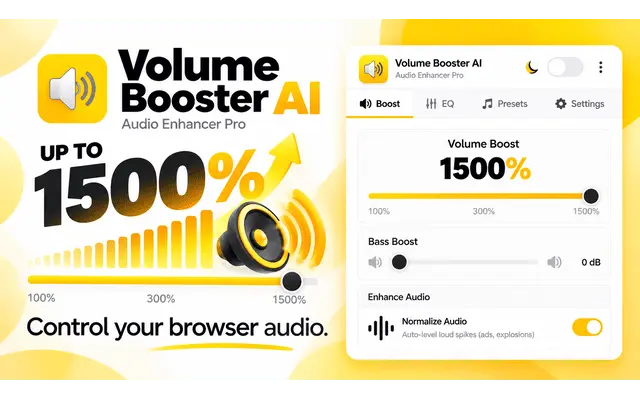
- Web Audio API interception: The extension hooks directly into Chrome's Web Audio API and captures every audio stream on the page — HTML5 video, audio elements, WebRTC calls — in real time with zero perceptible delay.
- GainNode amplification: A digital GainNode multiplies the audio signal. At 300%, you get 3× the original volume. At 1500% (Pro), you get 15×. The algorithm prevents clipping even at extreme levels.
- AI site detection: Volume Booster AI identifies the site you're on and automatically loads the best audio profile — so YouTube, Netflix, Spotify, and Zoom each sound their best without manual tuning.
- 10-band EQ (Pro): Fine-tune specific frequency ranges to boost bass, sharpen vocals, or reduce muddiness — not just raw loudness.
Key Features of Volume Booster AI
Up to 1500% Boost
Amplify any browser audio far beyond the OS limit. Free version goes up to 600%, Pro unlocks the full 1500%.
AI Auto-Volume
Detects YouTube, Netflix, Spotify, Zoom, Twitch and 10+ platforms and automatically applies the perfect audio profile.
10-Band Equalizer
Fine-tune bass, mids and treble independently. Not just louder — better sounding audio overall.
Distortion Prevention
Built-in clipping prevention keeps audio clean even at extreme boost levels. No crackling or distortion.
One-Click Activation
Click the extension icon, drag the slider, and boost instantly. No setup, no account, no learning curve.
100% Private
Only requests tab audio access. No personal data, no browsing history, no microphone. Reviewed by Google.
Works on Every Platform
Volume Booster AI amplifies audio across every major platform and service that runs in Chrome or Firefox:
It works on Windows, Mac, Linux, and Chromebook — any device running Chrome or Firefox. No OS-level software required.
 Add to Chrome — Free
How to Install & Use Volume Booster AI
-
Click "Add to Chrome" or "Add to Firefox" Use the button above or search "Volume Booster AI" in the Chrome Web Store or Firefox Add-ons. Click the install button — it takes less than 10 seconds.
-
Confirm the permissions A popup asks to confirm. The extension only requests access to tab audio — nothing else. Click "Add extension" to continue.
-
Pin it to your toolbar Click the puzzle icon 🧩 in Chrome → find Volume Booster AI → click the pin. This keeps the booster one click away at all times.
-
Open any audio or video and boost Play anything — a YouTube video, a Spotify track, a Zoom call. Click the Volume Booster AI icon and drag the slider up. Start at 200% and go from there.
-
Fine-tune with EQ (Pro) Upgrade to Pro to unlock the 10-band equalizer, AI Auto-Volume profiles, and boost up to 1500%. One-time payment, lifetime access.
Free vs Pro — Which Do You Need?
| Feature | Free | Pro — $14.99 |
|---|---|---|
| Max Volume Boost | Up to 600% | ✅ Up to 1500% |
| Per-Tab Audio Control | ✅ Yes | ✅ Yes |
| 10-Band Equalizer | ✗ No | ✅ Yes |
| AI Auto-Volume Profiles | ✗ No | ✅ Yes |
| Per-Site Memory | ✗ No | ✅ Yes |
| Distortion Prevention | ✅ Yes | ✅ Yes |
| Works on Chrome & Firefox | ✅ Yes | ✅ Yes |
| Payment | Free forever | $14.99 one-time |
Frequently Asked Questions
Is a volume booster extension safe to use?
Yes — as long as you install from the official Chrome Web Store or Firefox Add-ons. Volume Booster AI only requests tab audio access and has been reviewed by Google's security team. It does not collect personal data, access your microphone, or track your browsing history.
Will a volume booster damage my speakers?
At moderate levels (200–400%) the risk is minimal. Volume Booster AI includes built-in distortion prevention that limits audio clipping even at high boost levels. For extended sessions at extreme volumes (1000%+), use headphones or external speakers to protect built-in hardware.
Does it work on YouTube, Netflix, and Spotify?
Yes — Volume Booster AI works on every major streaming platform. The Pro version's AI Auto-Volume feature automatically detects each site and applies the ideal audio profile, so you never have to adjust settings manually when switching between platforms.
What's the difference between free and Pro?
The free version gives you up to 600% boost and per-tab control — more than enough for most users. Pro unlocks 1500% maximum boost, the 10-band equalizer, AI Auto-Volume profiles for 10+ platforms, and per-site memory that remembers your settings for every website.
Does Volume Booster AI work on Chromebook?
Yes — it works on any device running Chrome or Firefox, including Chromebooks. Since Chromebooks use Chrome as the primary browser, the extension amplifies all browser audio with no compatibility issues. See our full guide on how to make Chromebook louder for more tips.
Can I use it on multiple tabs at once?
Yes — Volume Booster AI works per tab. You can set different boost levels for different tabs simultaneously, boosting a YouTube video on one tab while leaving a music tab at normal volume.
Get Your Free Volume Booster Now
Ready to experience audio the way it was meant to sound? Volume Booster AI is the fastest, most advanced volume booster available for Chrome and Firefox — free to install, works in 60 seconds, and requires no account. For a deeper look at the extension's full feature set, read our complete Volume Booster Chrome Extension guide.
Choose your browser below and start boosting:
Free forever. No account required. Works instantly.
 Add to Firefox — Free